
On this page
Quick answer: install IPTV Smarters Pro (Firestick: Downloader code 78522; iPhone and Apple TV: Smarters Player Lite), choose Login with Xtream Codes API, enter your username, password and server URL, and select Add user.
What IPTV Smarters Pro is
IPTV Smarters Pro is a media player made for IPTV subscriptions. It shows live TV with a TV guide, a movie section and a series section, and supports catch-up on channels that offer it. It does not contain any channels: everything you see comes from the login you add. That is why it works with TrendyScreen on every device.
Download IPTV Smarters Pro on your device
| Device | Where to get it | Guide |
|---|---|---|
| Firestick / Fire TV | Downloader app, code 78522 | Firestick setup |
| Android TV, Google TV, box | Google Play, or Downloader | Android setup |
| Android phone or tablet | Google Play | Android setup |
| iPhone, iPad, Apple TV | App Store: “Smarters Player Lite” | Apple setup |
| Windows & Mac | Official Smarters website | PC & Mac setup |
| Samsung & LG TVs | TV store in some regions | Smart TV setup |
Only install Smarters from the sources above. Copies on random websites can be outdated or modified.
How to log in with Xtream Codes
Open the app and add a user
On first launch accept the terms. On the “Add user” screen pick Login with Xtream Codes API.
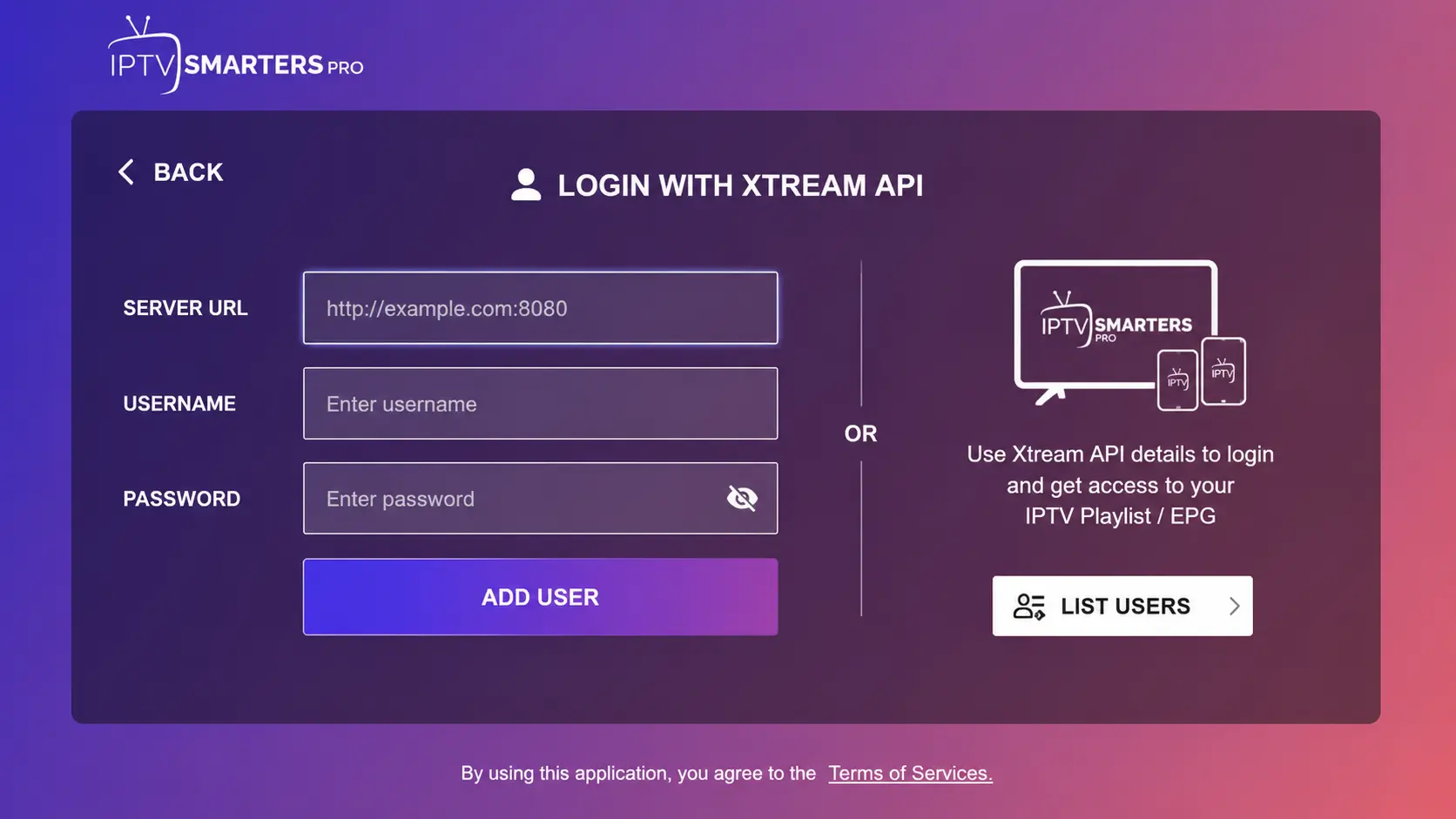
Type your details
- Any name: for example “TrendyScreen”.
- Username and Password: exactly as in your message (case-sensitive).
- URL: the server address, including
http://and the port.
Add the user and wait for the lists
Select Add user. Smarters downloads the live channels, movies, series and TV guide. On a slow device this can take a minute the first time.
Open Live TV
Choose Live TV, pick a country group, then a channel. Press OK twice for full screen.
Prefer an M3U link? Choose Load your playlist or file/URL instead and paste the M3U link we sent. Xtream Codes is better, though: it loads the TV guide, movies and series automatically. Why Xtream beats M3U.
The settings that matter
| Setting | Where | What to choose |
|---|---|---|
| Stream format | Settings > Stream Format | MPEGTS (.ts) first; HLS (.m3u8) if a channel stutters |
| Player | Settings > Player Selection | Built-in player; try VLC or MX Player if a channel will not open |
| TV guide time | Settings > Time Format / EPG time shift | Shift the guide if programme times are off |
| Parental control | Settings > Parental Control | Set a PIN and lock the channel groups children should not open |
| Automation | Settings > Automation | Auto-update channels and EPG daily |
Getting more out of Smarters
- Favourites: long-press a channel and add it to favourites so your daily channels are one click away.
- Search: use the magnifier in Live TV, Movies or Series instead of scrolling.
- Catch-up: on channels with a clock icon, open Catch Up to play programmes from the past days.
- Multi-screen: on capable devices, watch up to four channels at once (each uses part of your connection).
- Several users: add a second login for a family member and switch between them from the home screen.
When Smarters misbehaves
Most problems have a quick fix. “Failed to Authorize” is a login issue — see the full fix. Crashes, black screens or empty lists are covered in IPTV Smarters Pro not working, and stuttering in IPTV buffering.
Alternatives to Smarters
On Android TV and Firestick, TiviMate offers a better TV guide and recording. On Apple devices, IPTVX is more polished. Everything is compared in the best IPTV apps.
IPTV Smarters Pro questions
Is IPTV Smarters Pro free?
Yes. The player is free to download and use. It has no channels of its own; you add your provider’s login.
Where do I download IPTV Smarters Pro?
On Android phones and TVs it is usually in Google Play; on a Firestick it is installed with Downloader (code 78522); on iPhone, iPad and Apple TV the official version is called Smarters Player Lite; Windows and Mac versions are on the official Smarters website.
What is the difference between Smarters Pro and Smarters Player Lite?
Smarters Player Lite is the version for Apple devices in the App Store. It logs in the same way with Xtream Codes and has a simpler interface.
Why does Smarters say “Failed to Authorize”?
Usually a typo in the username, password or URL, a missing port, an expired line or a VPN. See the full Failed to Authorize fix.
How do I update the channel list?
On the home screen, open the menu (three dots or the user icon) and choose Refresh or Reload for Live TV, Movies and Series. The TV guide refreshes under Settings > EPG.