
On this page
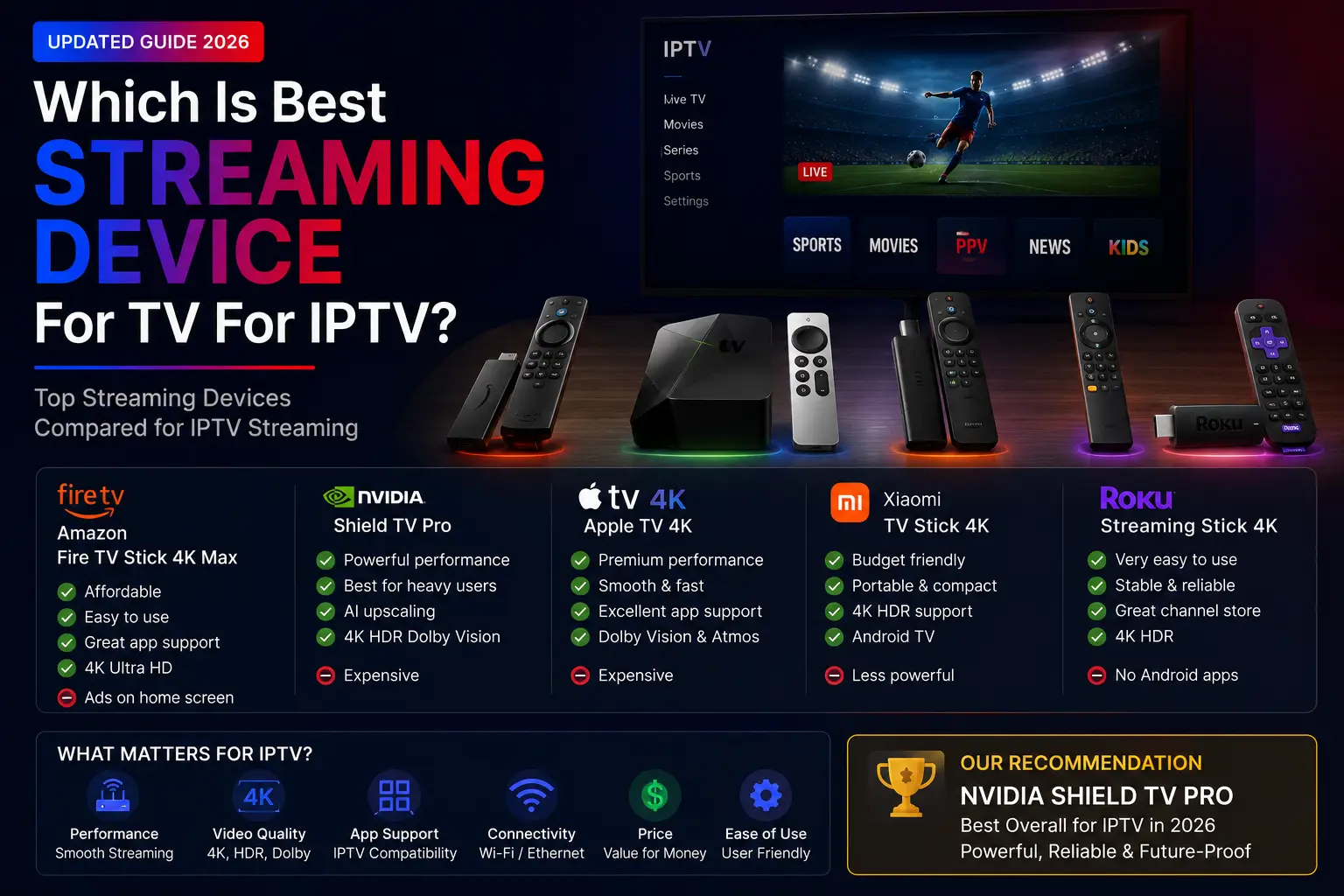
Short answer: the Fire TV Stick 4K Max is the best IPTV device for most people, NVIDIA Shield TV Pro is the best premium choice, Apple TV 4K suits Apple households, and a MAG or Formuler box is the simplest portal setup. If you have a recent Samsung or LG TV, you may not need a device at all.
Quick picks
| Device | Best for | IPTV apps |
|---|---|---|
| Fire TV Stick 4K Max | Best value, beginners | IPTV Smarters Pro, TiviMate, XCIPTV |
| Android TV box | App flexibility, storage | TiviMate, Smarters, IBO Player Pro |
| Google TV Streamer / Chromecast with Google TV | Clean Google TV interface | TiviMate, Sparkle TV, PVR Live |
| NVIDIA Shield TV Pro | Premium performance, 4K sport | TiviMate, Smarters, Kodi |
| Apple TV 4K | Apple households | IPTVX, Smarters Player Lite, TiviMax |
| Samsung / LG Smart TV | No extra device | IBO Player Pro, Smarters, HOT IPTV |
| MAG / Formuler | Portal (MAC) setup | Built-in portal, MyTVOnline |
What makes a good IPTV device?
- Speed: opens channels fast and handles 20,000-channel lists without freezing.
- App support: runs IPTV Smarters Pro, TiviMate and the other major players.
- Connection: an Ethernet port or strong Wi-Fi for live sport.
- Storage and memory: room for apps and their cache.
- 4K: strong 4K playback if your TV supports it.
Amazon Fire TV Stick
The most popular IPTV device: affordable, portable and easy to set up with the Downloader app. Choose the 4K or 4K Max over the basic Lite model — the extra power is noticeable with big playlists. Firestick setup guide.
Android TV box
Every IPTV app is available, storage is usually larger than on a stick, and most boxes have Ethernet. Great for large playlists and advanced users. Android setup guide.
Google TV Streamer and Chromecast with Google TV
A clean interface with access to Android TV apps. Google has moved from the old Chromecast to the Google TV Streamer, a fuller streaming box. Google TV setup guide.
NVIDIA Shield TV Pro
The most powerful Android TV device: excellent for 4K, live sport, Plex and Kodi. It costs more, but it lasts for years. Shield setup guide.
Apple TV 4K
Smooth and premium, with strong apps like IPTVX and Smarters Player Lite. Slightly less flexible than Android for IPTV, but ideal if you already use Apple devices. Apple setup guide.
Smart TV apps
No extra device needed on most recent Samsung and LG TVs. IBO Player Pro is popular because setup is simple: install it, send us the MAC address and device key, restart the app. Smart TV setup guide.
MAG and Formuler
Portal devices: you send the MAC address and add a portal URL — simple and stable once activated. Formuler boxes also run Android apps. MAG guide · Formuler guide.
Which should you choose?
- Beginners and best value: Fire TV Stick 4K Max.
- Most flexibility: Android TV box.
- Best performance: NVIDIA Shield TV Pro.
- Apple household: Apple TV 4K.
- No new device: your Smart TV with IBO Player Pro.
- Portal simplicity: MAG or Formuler.
Have a Roku? It has no IPTV apps — see IPTV on Roku for workarounds.
Streaming device questions
Which is the best streaming device for IPTV?
For most people, the Fire TV Stick 4K Max: affordable, easy to set up and fast enough for large channel lists. NVIDIA Shield TV Pro is the most powerful; Apple TV 4K is the best choice in an Apple household.
Is a Smart TV good enough for IPTV?
Often yes, with an app like IBO Player Pro or IPTV Smarters. Older or budget TVs can be slow with big playlists; a streaming stick then makes a clear difference.
Do I need 4K for IPTV?
Only if your TV and internet support it. A 4K-capable device is still worth it: it is usually faster overall, which helps with channel switching.
MAG box or Android box?
MAG boxes are simple portal devices and very stable; Android boxes run every app and can be used for much more. If you want flexibility, choose Android.