
Installation Guide
How to Setup IPTV on Formuler Z11 Pro Max
The Formuler Z11 Pro Max is a powerful Android TV box built specifically for IPTV streaming. This guide shows you how to get Trendyscreen IPTV running on it in just a few minutes.
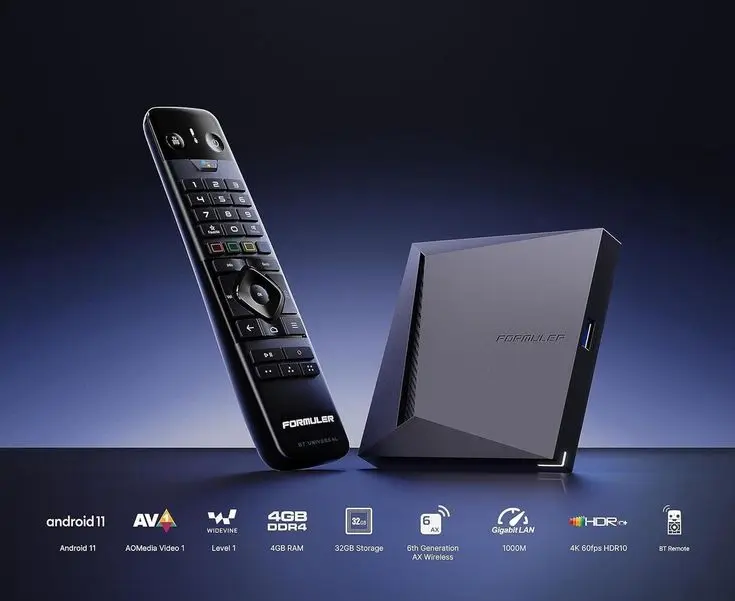
Formuler devices are purpose-built for IPTV, running on Android TV with a dedicated Stalker Portal client alongside full access to the Google Play Store. This means you can use either a built-in portal setup or a standard IPTV app like IPTV Smarters Pro with your Trendyscreen IPTV login.
Option 1: Using IPTV Smarters Pro (Recommended)
Since the Formuler Z11 Pro Max runs Android TV, it supports all the standard Android TV IPTV apps.
1
Open the Google Play Store on your Formuler device.
2
Search for IPTV Smarters Pro (or TiviMate/XCIPTV).
3
Install and open the app.
4
Select Login with Xtream Codes API.
5
Enter your Trendyscreen username, password and server URL.
This is the simplest method and works the same way it does on any other Android TV device.
Option 2: Using the Built-In Stalker Portal
Formuler devices include a native Stalker Portal client, which some IPTV providers use as an alternative to Xtream Codes.
1
From the Formuler home screen, open the Portal or Settings app.
2
Add a new portal profile.
3
Enter the portal URL provided by your IPTV service, if applicable.
4
Save and launch the portal to load your channels.
For Trendyscreen IPTV, we recommend using the Xtream Codes API method through IPTV Smarters Pro or TiviMate, as this gives you the widest app compatibility and easiest support.
Why the Formuler Z11 Pro Max Works Well for IPTV
- Strong hardware built specifically for smooth 4K IPTV playback.
- Runs Android TV with full Google Play Store access.
- Supports both Xtream Codes apps and Stalker Portal setups.
- Reliable Wi-Fi and Ethernet options for a stable connection.
Troubleshooting
Channels Not Loading
- Check your internet connection and restart your router.
- Confirm your Trendyscreen subscription is active.
- Restart the IPTV app or the Formuler device itself.
Login or Authorization Errors
- Double-check your username, password and server URL.
- Turn off any VPN and try again.
- Contact Trendyscreen support if the issue continues.
Related Guides
Need Help Setting Up IPTV on Formuler Z11 Pro Max?
Contact Trendyscreen support and we will help you install and configure IPTV on your Formuler device quickly.
Contact Support →